Page 1 of 1
blurry effect in stacking
Posted: 30.01.2020 18:07
by denisg
hello I would like to know how to avoid this blurry effect in the background
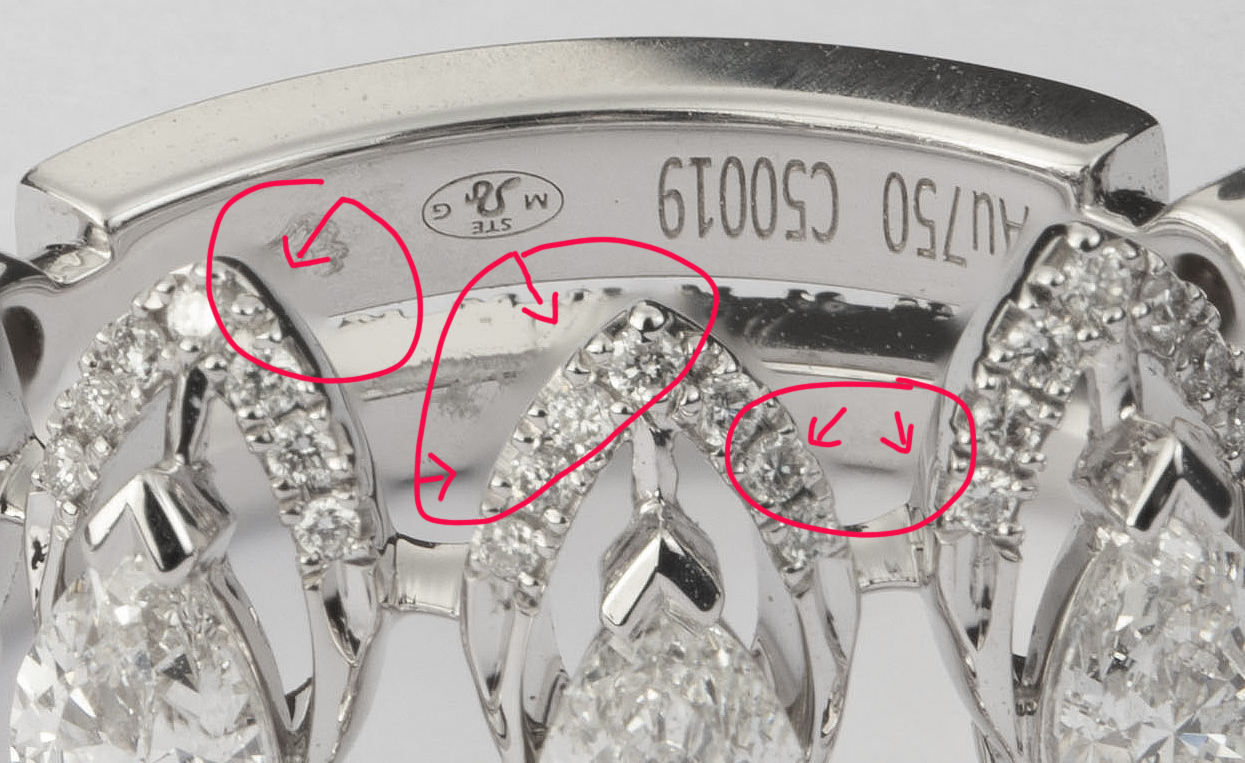
- bague 7690 2.jpg (682.13 KiB) Viewed 11705 times
Re: blurry effect in stacking
Posted: 31.01.2020 15:21
by knog17
I don't think you can avoid it.
Look which render method works best for your motive, then repair such flaws with Retouching tools in Helicon as good as possible.
Ideally use Photoshop after that for a clean finish.
Re: blurry effect in stacking
Posted: 11.02.2020 09:57
by Catherine
There is no direct and straightforward solution, but you have a couple options:
a) Use rendering method C or A.
b) Use method B, but reduce the radius and smoothing values.
c) Render with method B, then C. Then go to retouching and patch the problematic areas on the B result using the C result as source.
Re: blurry effect in stacking
Posted: 18.02.2020 04:57
by Davey-2
Please explain how one can one use one image rendered from A or C to patch a B rendering
Couldn't figure it out
thanks
Re: blurry effect in stacking
Posted: 21.02.2020 07:39
by Catherine
Davey-2 wrote: 18.02.2020 04:57
Please explain how one can one use one image rendered from A or C to patch a B rendering
After you've finished both renderings (say, B and A), you can click the B result, go to Retouching, then click "Use another output as source" under the list of source images and select the A result. Now you can proceed to copy parts of the A image onto B using retouching "Copy" brush.