Page 1 of 1
Android Helicon Remote and file storage
Posted: 12.02.2012 00:34
by samiboy
Just discovered Helicon remote today, and was thrilled to find that it has the ability to take up to 11 shots in HDR mode. Hooked up my Nikon D7000 to my Acer Iconia A500, and voila- it worked great. The camera snapped off 11 shots in .3 EV increments.
However, when it got done, I could not find the photos! I looked in the default folder specified by the program, but the 11 pictures were not there. I also tried resetting the default path in the settings to /mnt/sdcard/pictures- but it still does not seem to store pictures there.
Any body have a suggestion or run into this on a different model? Or am I just a noob and I'm looking in the wrong place....
Re: Android Helicon Remote and file storage
Posted: 13.02.2012 13:51
by Stas Yatsenko
For each stack Remote should create a subfolder in sdcard/pictures (by default) and store images in that subfolder. The folder name (by default) contains the number of stack and the date of shooting.
Did you use file manager to look for the files in the Sdcard/Pictures folder? Did you try accessing that folder from PC?
Re: Android Helicon Remote and file storage
Posted: 13.02.2012 16:44
by samiboy
Stas-
After discovering that Helicon Remote could do HDR, I plugged in my D7000 and started firing away. I didn't bother to look for where the images would be stored. Then I unplugged the tablet from my camera, and took the tablet back to my pc to look at the photos. I didn't find any (after running a global search for *.jpg on the device using Windows 7). However, I did note that my Acer Iconia Tab did not have the folder /mnt/sdcard/Pictures. It only had the mnt folder.
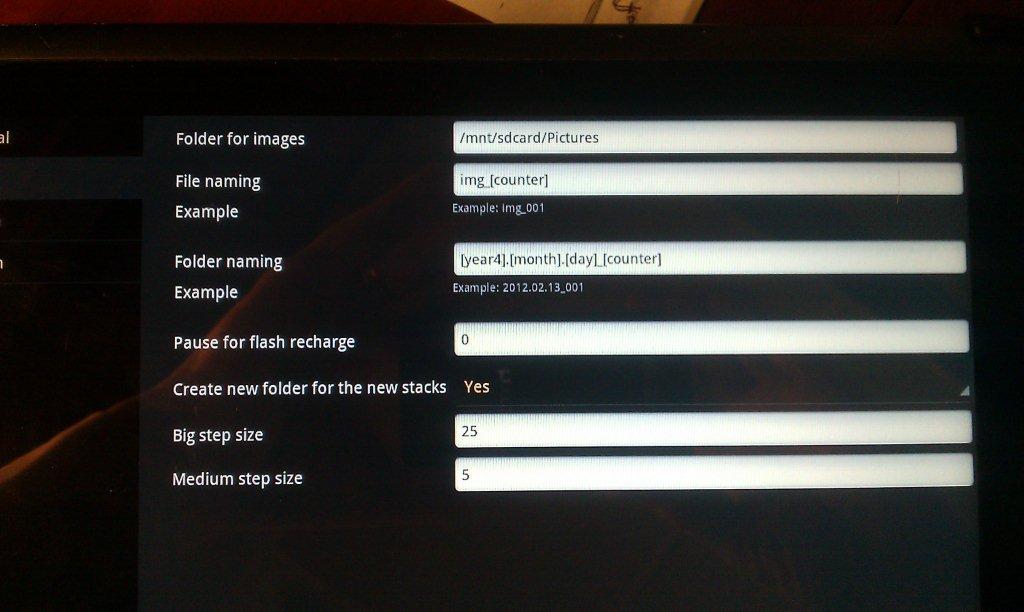
- Helicon Snapshot of Folder Setting
- IMAG0047.jpg (68.08 KiB) Viewed 5503 times
So, I retyped /mnt/sdcard/Pictures to be /DCIM/D7000 in the hopes that on my next round of shooting, I would find my pictures there instead. Unfortunately, that did not work either. After trying this, I just reset the folder back to /mnt/sdcard/Pictures.
1) Should I go in to my Acer Iconia and actually create the /sdcard/Pictures folders? (at work now, but can try this evening; and
2) Should HR be creating the folders on its own?
3) To the best of your knowledge, does the D7000 have any problems actually transferring photos back to an Android device?
Thanks for the response!
Sam
Re: Android Helicon Remote and file storage
Posted: 14.02.2012 02:35
by samiboy
Stas-
Must have been the camera, or me. I plugged it back in tonight and it is working. Doesn't appear to be a bug- just user error or equipment failure!
Sam
Re: Android Helicon Remote and file storage
Posted: 15.02.2012 12:08
by Stas Yatsenko
Thanks for the tip. We will check what is happening if the folder does not exist.