Renders as Retouching source + Aligned multiple renders
Posted: 13.01.2014 01:29
I have a suggestion for the retouching module. Perhaps it already exists, but I haven't been able to find it.
_______________________________________
I tend to make several renders per image in order to find the best one. Some of them are good in areas where others are weak and visa-versa. I would like to be able to use one of these other rendered images for cloning/retouching into the render that I have chosen as the best. So, instead of using F9 to choose my source image, I would, for example, option-click a different render, which would then become the cloning source.
It seems counter-logical to me, to be cloning from un-stacked source images, where depth of field may be extremely narrow and I may need to work from several source images to fix a single area, when there is a perfectly good render sitting there unused and which would make the job an absolute breeze!
Here's an example :
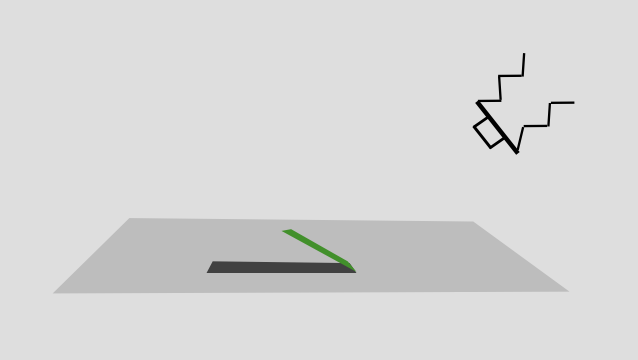
The object (in green) is obscuring a large area (dark gray) in terms of depth of field, which could represent perhaps 7 or 8 separate source images in my work. The C method would give me a sharp edge and clean render in this area, but it would be very unlikely for me to want to use a C render because the 'look' it creates doesn't suit my work. So, I'd like to be able to use the B render as my choice, but to brush in the C render in areas where it is suitable.
_______________________________________
A separate but associated suggestion :
I would also like to be able to work with multiple renders in other imaging software after saving out to tif. This necessitates that all the renders must 'fit' perfectly on top of each other. By this I mean, that pixel dimensions should be identical and any distortion that may have been introduced during their respective renders, must be unified when the renders are saved, so that they can all be brushed in and out without any positioning mismatches appearing. In other words, HF will align all the renders perfectly before they are saved to tif.
Grant
_______________________________________
I tend to make several renders per image in order to find the best one. Some of them are good in areas where others are weak and visa-versa. I would like to be able to use one of these other rendered images for cloning/retouching into the render that I have chosen as the best. So, instead of using F9 to choose my source image, I would, for example, option-click a different render, which would then become the cloning source.
It seems counter-logical to me, to be cloning from un-stacked source images, where depth of field may be extremely narrow and I may need to work from several source images to fix a single area, when there is a perfectly good render sitting there unused and which would make the job an absolute breeze!
Here's an example :
The object (in green) is obscuring a large area (dark gray) in terms of depth of field, which could represent perhaps 7 or 8 separate source images in my work. The C method would give me a sharp edge and clean render in this area, but it would be very unlikely for me to want to use a C render because the 'look' it creates doesn't suit my work. So, I'd like to be able to use the B render as my choice, but to brush in the C render in areas where it is suitable.
_______________________________________
A separate but associated suggestion :
I would also like to be able to work with multiple renders in other imaging software after saving out to tif. This necessitates that all the renders must 'fit' perfectly on top of each other. By this I mean, that pixel dimensions should be identical and any distortion that may have been introduced during their respective renders, must be unified when the renders are saved, so that they can all be brushed in and out without any positioning mismatches appearing. In other words, HF will align all the renders perfectly before they are saved to tif.
Grant