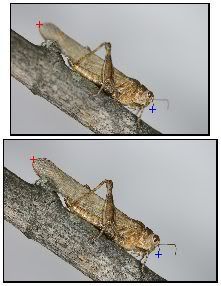
Size differential between Source and Processed in Touchup
Posted: 18.09.2006 02:47
From what I understand the largest effective image outline in a group becomes the basis for the final processed photo.
If I shoot 20 images with a focus rack, and move the rack from the frontal-most focal plane to the farthest focal plane, each copy of my subject in the image will be a percentage larger than the one previous to it. The object appears to be closer, and subsequently larger, in each shot.
While the actual size difference from first image to the last image might appear to be quite small, when using the Copy tool in Touchup, it's enough to make lining up a specific source image with the processed image difficult or impossible.
Perhaps I missed a way to line up the images. But, if not, I'd like to ask for that feature in subsequent releases. The processing algorythm already knows how to do this. I'm wondering if we can have a button that would resize and align a selected source image with the processed image automatically for touchup.
Failing that, perhaps we could have a manual option where we selected two specific detail points on our processed image and then as we work with each source image we would select the corresponding two details in the source image. The program could then resize the source image based on the differental of the distances between the selected points.
Or... am I missing something that is already there?
If I shoot 20 images with a focus rack, and move the rack from the frontal-most focal plane to the farthest focal plane, each copy of my subject in the image will be a percentage larger than the one previous to it. The object appears to be closer, and subsequently larger, in each shot.
While the actual size difference from first image to the last image might appear to be quite small, when using the Copy tool in Touchup, it's enough to make lining up a specific source image with the processed image difficult or impossible.
Perhaps I missed a way to line up the images. But, if not, I'd like to ask for that feature in subsequent releases. The processing algorythm already knows how to do this. I'm wondering if we can have a button that would resize and align a selected source image with the processed image automatically for touchup.
Failing that, perhaps we could have a manual option where we selected two specific detail points on our processed image and then as we work with each source image we would select the corresponding two details in the source image. The program could then resize the source image based on the differental of the distances between the selected points.
Or... am I missing something that is already there?