Page 1 of 1
Dust map files
Posted: 10.05.2016 20:34
by MikeCT
I have two questions.
Does the Dust Map file have to be same file type as the stack files?
Can the Dust Map file be NEF? It doesn't seem to recognize them.
Re: Dust map files
Posted: 11.05.2016 13:50
by Stas Yatsenko
The Dust Map file don't have to be of the same file type but the resolution of Dust Map image must be exactly the same as source files resolution:
http://www.heliconsoft.com/focus/help/e ... ml#HF_DUST
Re: Dust map files
Posted: 21.06.2016 00:06
by MikeCT
I am still not sure what I am doing wrong. Stacks created with and without a Dust Map look identical. The Dust map is shot under the same conditions as the stack.
Re: Dust map files
Posted: 21.06.2016 11:07
by Stas Yatsenko
Please upload your stack and your Dust Map image to our server as described at
http://www.heliconsoft.com/ftp-server/
If you are user of GoogleDrive, DropBox, OneDrive or other cloud service, you can upload your files there and send us a link.
Re: Dust map files
Posted: 21.06.2016 16:26
by MikeCT
Posted. The map is stored as Dustmap, the stack is 76 images. Everything is in jpeg format
Re: Dust map files
Posted: 22.06.2016 16:56
by Stas Yatsenko
Dust tracks are especially evident when using method C to merge the stack. The problem with your dust map is that it does not includes dust points visible on stack frames. Please see the crop from the dust map and the frame:
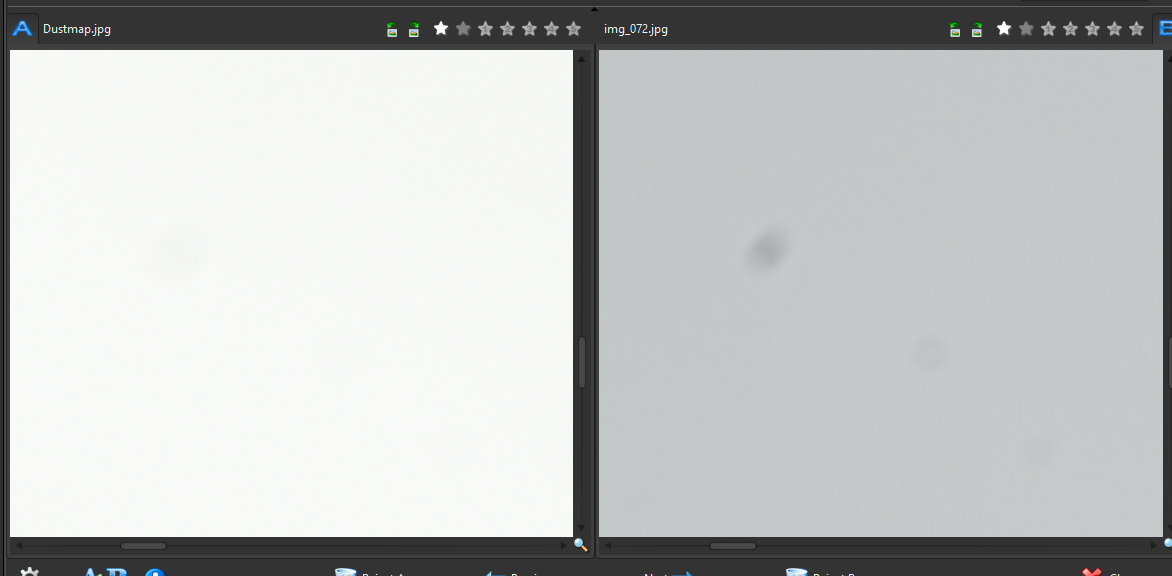
- 2016-06-22_16-54-18.png (525.91 KiB) Viewed 9377 times
I am not sure why this happens. I would suggest to use exposure compensation -1 when shooting dust map and focus at roughly the same distance as in your stack.