Page 1 of 1
Artefacts using "texture only"
Posted: 25.08.2026 22:30
by FS_Toto26
Hello Catherine,
I noticed that when doing post‑processing with the “texture only” option, some strange artifacts appear.
You can find an example image attached.
Best,
Toto
Re: Artefacts using "texture only"
Posted: 25.08.2026 23:41
by Catherine
Hello Toto,
Is this with Focus 8 or 9?
Re: Artefacts using "texture only"
Posted: 26.08.2026 13:39
by Catherine
We need the stack, are you able to upload the source images to our private server so we could reproduce the issue? For limited-time internal use only.
We also need to know the exact version of Helicon Focus in which this occurs (a screenshot of the About dialog, or just tell us the version and the build date from About).
Re: Artefacts using "texture only"
Posted: 28.08.2026 08:45
by FS_Toto26
Hi Catherine,
sorry for the delayed answer.
It is version 9.0.4 build date May 19 2026 - with 8 I don't have this issue (even with these images).
You can definitely get the stack — just send me the link where I can upload the images. Since I used the CO plugin, I will send you the raw files.
Re: Artefacts using "texture only"
Posted: 28.08.2026 12:00
by Catherine
Thank you! please
upload here.
Re: Artefacts using "texture only"
Posted: 29.08.2026 17:54
by FS_Toto26
I’ve uploaded the files. I also noticed that the issue mainly occurs when using small brush sizes (around 10%).
Re: Artefacts using "texture only"
Posted: 08.09.2026 10:25
by ilyacolton
To give you a clearer idea of the problem, I have attached an example image showing the artifacts. It would be great if you could take a look and share your thoughts on this.
Re: Artefacts using "texture only"
Posted: 08.09.2026 18:45
by Catherine
Sorry, I downloaded the stack but didn't try it until now. How do I reproduce this? I found the spot on your screenshot, but which rendering method, rendering parameters, brush parameters, brush type, source image if it's the "Copy parts from source image" brush (I assume it is)? I couldn't reproduce the problem so far.
And have you tried in the new version 9.0.6 (available on the website:
https://www.heliconsoft.com/software-downloads/)?
Re: Artefacts using "texture only"
Posted: 13.09.2026 13:03
by FS_Toto26
I’m experiencing the issue in Version 9.0.6 as well.
The stacking parameters were B 7 3 and C 7.
For the post‑processing I used the parameters shown in the screenshot.
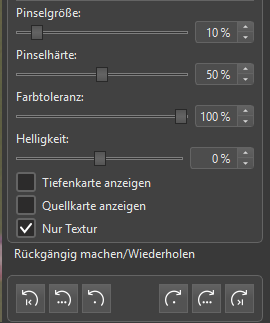
- Parameter.png (14.42 KiB) Viewed 601 times
I noticed the following:
The problem occurs when you select a new image as the source and start retouching as soon as the brush is ready.
If you wait more than about 10 to 15 seconds after the brush becomes ready, the problem usually disappears.